
Automation used to mean a developer wiring up scripts that broke the moment an API changed. In 2026 it means something a non-technical founder, marketer, or operations lead can set up in an afternoon — and increasingly, it means handing whole multi-step tasks to AI rather than just moving data between apps. For a small team, that shift is the difference between drowning in repetitive work and spending your time on the things only people can do.
This guide is a practical starting point: what AI automation actually is, how to decide what to automate first, which platform fits your situation, and the handful of workflows that pay off fastest. No hype, and no pretending automation is magic — it isn’t, and treating it that way is how teams waste a month building something they never use.
What “AI automation” actually means
Traditional automation is rule-based: when this happens, do that. A new form submission creates a CRM record; a paid invoice posts a message to a channel. The logic is fixed, and that predictability is a feature — you want a payroll workflow to behave the same way every time.
AI automation adds a second layer: steps that interpret rather than just move data. An AI step can read an incoming email and decide which team it belongs to, summarise a long document before it’s filed, draft a reply for a human to approve, or categorise support tickets by sentiment. Further along the spectrum sit AI agents — tools you give a goal rather than a fixed sequence, which then plan and carry out the steps themselves.
The practical takeaway: use rules for anything that must be exact and repeatable, and reserve AI steps for the judgment-shaped gaps in between — the reading, sorting, drafting, and summarising that used to require a person.
Start by mapping, not building
The most common automation mistake is starting with a tool instead of a task. Before you open any platform, spend an hour listing the work your team repeats every week. For each item, note three things: how often it happens, how long it takes, and how much judgment it needs.
The best first candidates are high-frequency, low-judgment tasks: copying data between systems, sending routine notifications, formatting and filing documents, chasing reminders. These are reliable, safe to automate, and give you an early win that builds confidence. Leave the high-judgment work — anything touching money, contracts, hiring, or customer trust — for later, and even then keep a human in the approval loop.
Choosing a platform
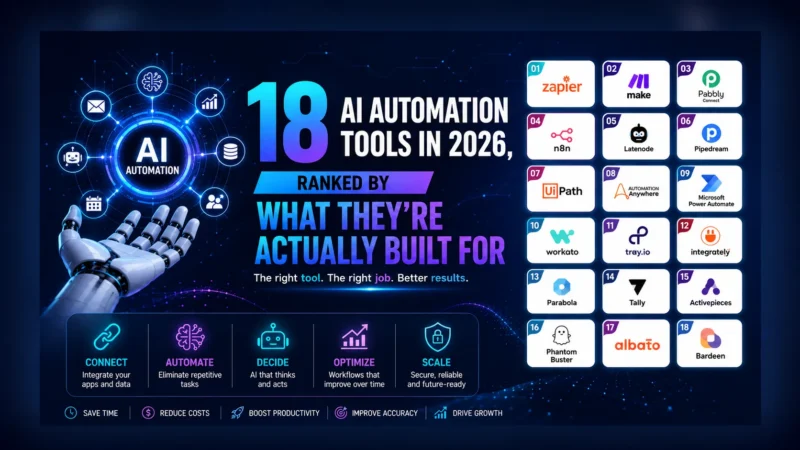
Three platforms cover almost every small-team need, and the right one depends less on features than on who’s building and how complex the logic gets.
Zapier — easiest to start
If no one on your team writes code and you want results today, start here. Zapier connects the widest range of apps and now includes AI steps and a copilot that builds automations from a plain-language description. It gets pricey as task volume grows and is less suited to branching, multi-path logic — but for straightforward “when X, do Y” flows it’s the fastest path from idea to working automation.
Make — best for complex, visual workflows
When your logic involves branches, loops, filtering, and several apps in one flow, Make gives you a visual canvas to build and see the whole thing. It has a steeper learning curve than Zapier and complex scenarios can get hard to debug, but it handles sophisticated automation that Zapier strains against, and its pricing tends to stretch further at volume.
n8n — for control and self-hosting
If you have a technical person, care about data privacy, or want to avoid per-task pricing, n8n is worth a look. It’s a source-available automation tool you can self-host, which keeps sensitive data on your own infrastructure and removes usage-based costs. The trade-off is setup and maintenance: you’re running software, not just configuring a SaaS account.
Adding AI into the loop
Once a basic workflow runs, AI is what turns it from plumbing into something that saves real thinking time. A few reliable patterns:
- Triage: an AI step reads incoming messages or tickets and routes, tags, or prioritises them before a human sees them.
- Summarise: long emails, call transcripts, or documents get condensed to a few lines and attached to the relevant record.
- Draft: the workflow prepares a reply, a social post, or a summary for a person to review and send — assistance, not autopilot.
For tasks too open-ended for a fixed sequence, AI agents take a goal and work through it. Tools like Lindy let you build assistants that handle email, scheduling, and CRM updates triggered by events across your apps, while Manus runs broader multi-step tasks in its own environment and returns finished work. You can browse the full set in our AI Tools Directory.
Five starter workflows worth building
Concrete beats abstract, so here are five automations most small teams can build quickly and actually keep using:
- Lead capture to CRM: a new form submission creates a contact, notifies the right person, and logs the source — no manual copying.
- Meeting notes to tasks: a call transcript is summarised by AI, and action items are created as tasks assigned to the right people.
- Inbox triage: incoming support email is read, categorised, and routed, with a draft reply prepared for common questions.
- Content repurposing: a published article is turned into draft social posts for review, so distribution doesn’t depend on remembering to do it.
- Weekly digest: data from a few tools is pulled together and summarised into one update, replacing several manual status checks.
How not to over-automate
Automation has a failure mode that’s the opposite of doing nothing: automating so aggressively that you can’t see what’s happening or trust the output. A few guardrails keep you on the right side of it.
Keep a human in the loop for anything irreversible or customer-facing — let AI draft, but let a person approve. Build in visibility: a workflow should log what it did and tell you when it fails, not silently break. Start with one or two automations and run them for a couple of weeks before adding more, so you understand each one before you depend on it. And review periodically — apps change, and an automation that worked in January can quietly stop working by spring.
The goal isn’t to automate everything. It’s to remove the repetitive, low-judgment work that’s stealing your team’s attention, and to keep human judgment exactly where it belongs.
Where to go next
Pick one workflow from the list above — ideally the most annoying repetitive task you do each week — and build just that, in whichever platform matches your comfort with complexity. Get it working, live with it for two weeks, then add the next. Automation compounds: each reliable workflow frees up the time and confidence to build the next one.
When you’re ready to add AI steps or agents, our AI Tools Directory lists and rates the options across automation, agents, and productivity so you can pick by fit rather than by hype.