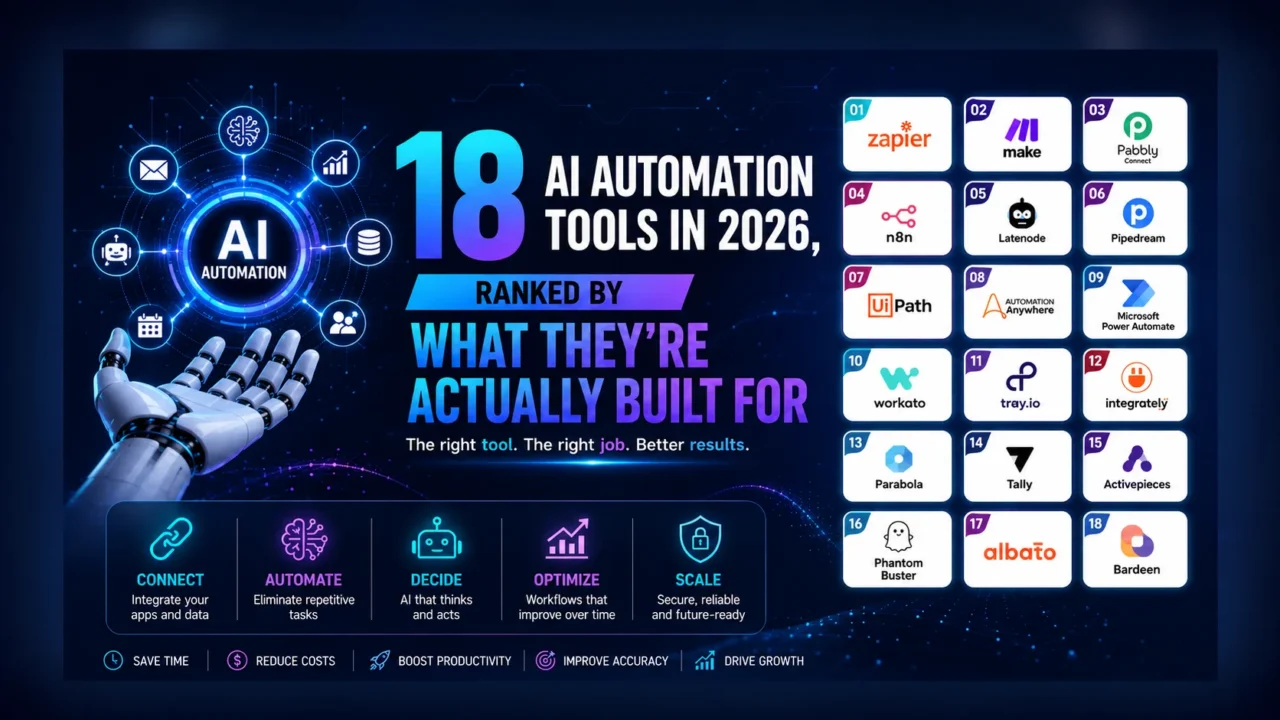
AI Automation Tools used to be plumbing. You connected one app to another, a trigger fired, data moved, and that was the whole job. In 2026 the plumbing is still there, but the tools sitting on top of it have started making decisions. A workflow no longer just copies a lead from a form into your CRM; it reads the lead, scores it, drafts a reply in your voice, and waits for a human to approve the send. That shift, from fixed pipes to systems that reason, is what most people now mean when they say “AI automation,” and it changes how you should pick a tool.
The honest answer to “which automation tool is best” is that the question is wrong. There is no single winner, because these platforms are built for different jobs, different skill levels, and different tech stacks. A solo founder gluing two SaaS apps together has almost nothing in common with an operations team orchestrating governed, audited workflows across a hundred internal systems. This guide sorts the field by the job each tool is built for, so you can match a platform to your situation instead of chasing a leaderboard.
First, get the categories straight
Three labels get used interchangeably and shouldn’t be. iPaaS (integration platform as a service) connects cloud apps through APIs: Zapier and Make live here. RPA (robotic process automation) drives software the way a person would, clicking through screens and legacy systems that have no API; UiPath and Automation Anywhere are the names to know. AI agents are the newer layer, where the platform is given a goal and decides the steps itself at runtime rather than following a flowchart you drew.
The practical distinction worth holding onto: most “automation” is deterministic. You define the workflow, and it runs the same way every time. Agentic automation is goal-driven, the model decides what to do, which is powerful and unpredictable in roughly equal measure. The best platforms in 2026 blend both, letting you drop an AI step or an agent into an otherwise rule-based workflow. Knowing which mode you actually need keeps you from buying an enterprise agent platform to do a job a single Zap could handle.
What you are actually trying to achieve
Before comparing features, name the objective. Most automation projects exist to do one of four things: remove manual data entry and copy-paste between tools; eliminate the delays that happen when work sits in someone’s inbox waiting for a handoff; enforce a process so it runs consistently instead of however each person remembers it; or free skilled people from repetitive work so their time goes to judgment calls instead. If you can’t state which of these you’re solving, no tool will save you, because you’ll automate a broken process faster. Pick the objective first; the platform comes second.
No-code generalists: start here if you’re not a developer
Zapier remains the default for a reason. Its library tops 8,000 apps, its Copilot now builds automations from a plain-language description, and Zapier Agents add AI that can act across your stack rather than just shuttle data. The catch is cost: pricing scales with task volume, so a workflow that runs constantly can get expensive, and its linear builder struggles once your logic needs real branching.
That’s where Make earns its following. Its visual canvas handles complex branching, loops, and error recovery far more gracefully, its Maia assistant and AI Agents cover the intelligent steps, and it tends to be cheaper at scale. The trade-off is a steeper learning curve and per-operation pricing that can surprise you if you don’t watch it. For tighter budgets, Pabbly Connect offers flat-rate, task-based pricing and doesn’t bill you for internal steps, while Albato targets SMBs and SaaS products with embedded integrations. At the simplest end, IFTTT is still the easiest way to wire up single-step applets and smart-home devices, though it was never built for business logic.
Developer-first: when you’d rather write code than drag boxes
If a canvas feels like a cage, the developer-oriented platforms give you escape hatches. Pipedream is event-driven and API-first, with serverless code steps in Node.js, Python, Go, and Bash alongside thousands of pre-built actions, which makes it a natural fit for AI and webhook workflows. Latenode takes a low-code path, pairing a visual builder with full JavaScript, headless-browser automation, and built-in AI models, billed by execution time rather than task count. Both reward people comfortable dropping into code when the no-code path runs out.
Open-source and self-hosted: own your data and your costs
For teams that don’t want their workflows, or their data, living on someone else’s server, two names dominate. n8n is the strongest all-rounder here: self-hostable, hundreds of integrations, native AI agent and LLM nodes, and no per-task metering when you run it yourself. Activepieces is fully open source with a clean visual builder, AI pieces, and MCP support, positioned as a no-lock-in alternative to the closed platforms. The shared cost of both is operational: self-hosting means you maintain the thing, handle updates, and own the uptime.
Enterprise iPaaS and RPA: governance at scale
Once automation becomes business-critical, the requirements change from “does it work” to “can we audit it, secure it, and trust it across departments.” Workato is built for exactly that, orchestrating apps and data with low-code recipes, SOC 2 and HIPAA compliance, and AI-assisted recipe building, though it’s sales-led with no free tier. On the RPA side, UiPath leads for automating desktop and legacy systems that lack APIs, now extended with AI agents and document understanding. Automation Anywhere covers similar ground with cloud-native bots and agentic process automation for high-volume back-office work. Tray.ai sits between worlds, offering low-code enterprise automation with its Merlin AI layer for technical teams building API-driven integrations.
Ecosystem-native: when you’re already locked into a suite
If your organization standardized on a single vendor, the best automation tool is often the one already wired into it. Microsoft Power Automate combines cloud flows, desktop RPA, and Copilot with deep ties into Microsoft 365, Teams, SharePoint, and Dynamics; its value is hard to beat inside that stack and harder to justify outside it. Zoho Flow plays the same role for Zoho users, connecting the suite through multi-step flows with logic and delays, especially economical bundled within Zoho One.
AI-native builders: describe it, don’t draw it
The newest category leans hardest into the “tell it what you want” promise. Gumloop builds AI agents and automations from plain-language descriptions, with built-in LLM access so you don’t juggle API keys, plus MCP integrations and a drag-and-drop canvas. Relay.app adds the feature serious teams keep asking for: human-in-the-loop approval steps, so an AI can do the work but a person signs off before anything irreversible happens. Bardeen runs in the browser, scraping web data and powering sales and go-to-market workflows through a natural-language builder. These are the fastest tools to get started with and, for now, the ones with the smallest integration libraries.
AI automation tools compared
| Tool | Built for | Pricing | Rating | What sets it apart |
|---|---|---|---|---|
| Zapier | Non-technical teams | Freemium | 4.7 | Largest app library (8,000+), AI Copilot and Agents |
| Make | Complex branching workflows | Freemium | 4.6 | Visual canvas, strong error handling, cost-effective at scale |
| Workato | Governed enterprise automation | Paid | 4.5 | Enterprise governance, SOC 2 and HIPAA compliance |
| Power Automate | Microsoft 365 shops | Freemium | 4.4 | Cloud flows plus desktop RPA, deep M365 integration |
| UiPath | Legacy-heavy processes | Freemium | 4.4 | Market-leading RPA, agentic automation, free Community edition |
| n8n | Self-hosted AI workflows | Freemium | 4.4 | Open, self-hostable, native AI agent and LLM nodes |
| Pipedream | Engineers over canvases | Freemium | 4.3 | Serverless code steps in multiple languages |
| Activepieces | Free, self-hosted setups | Freemium | 4.3 | Fully open source, no execution limits when self-hosted |
| Automation Anywhere | High-volume operations | Freemium | 4.2 | Cloud bots, agentic and document automation |
| Pabbly Connect | Tight budgets | Freemium | 4.2 | Flat-rate pricing, no charge for internal steps |
| Latenode | Low-code with real code | Freemium | 4.2 | Visual builder plus JavaScript, execution-time pricing |
| Tray.ai | Technical enterprise teams | Paid | 4.1 | Low-code with the Merlin AI layer |
| Zoho Flow | Zoho ecosystem users | Paid | 4.1 | Deep Zoho integration, affordable in Zoho One |
| Bardeen | Sales and GTM teams | Freemium | 4.1 | Browser-based scraping and workflows, no code |
| Gumloop | Non-technical agent building | Freemium | 4.1 | Natural-language agents, built-in LLM access |
| Relay.app | Daily ops with oversight | Freemium | 4.1 | Human-in-the-loop approval steps |
| Albato | SMBs and SaaS products | Freemium | 4.0 | Affordable iPaaS with embedded integrations |
| IFTTT | Individuals and smart home | Freemium | 4.0 | Simplest single-step applets, strong IoT support |
How to actually choose
Work through four questions in order. First, who builds and maintains this, a non-technical operator or an engineer? That alone narrows the field to the no-code generalists or the developer-first platforms. Second, where does your work already live? If you’re a Microsoft or Zoho shop, the native tool usually wins on integration depth and price. Third, how much does control matter? Regulated data, audit requirements, or a need to self-host pushes you toward Workato, the open-source options, or RPA platforms. Fourth, how complex is the logic? Simple linear flows suit Zapier; heavy branching wants Make or n8n; goal-driven tasks point to the AI-native builders.
The one trap that catches almost everyone is pricing model, not price. Task-based and per-operation billing looks cheap in a trial and scales painfully once a workflow runs thousands of times a day. Map your real monthly volume against each tool’s metering before you commit, because the platform that’s cheapest at ten runs a day is rarely cheapest at ten thousand.
Start small. Automate one painful, well-understood process end to end, measure the time it actually saves, and only then expand. The teams that get the most from these tools treat automation as a discipline, not a shopping spree, and they keep a human in the loop wherever a mistake would be expensive to undo.
Want to go deeper on any single platform? Each tool above links to its full review, and you can browse the complete, rated set on the AITechSpark AI Tools Directory.